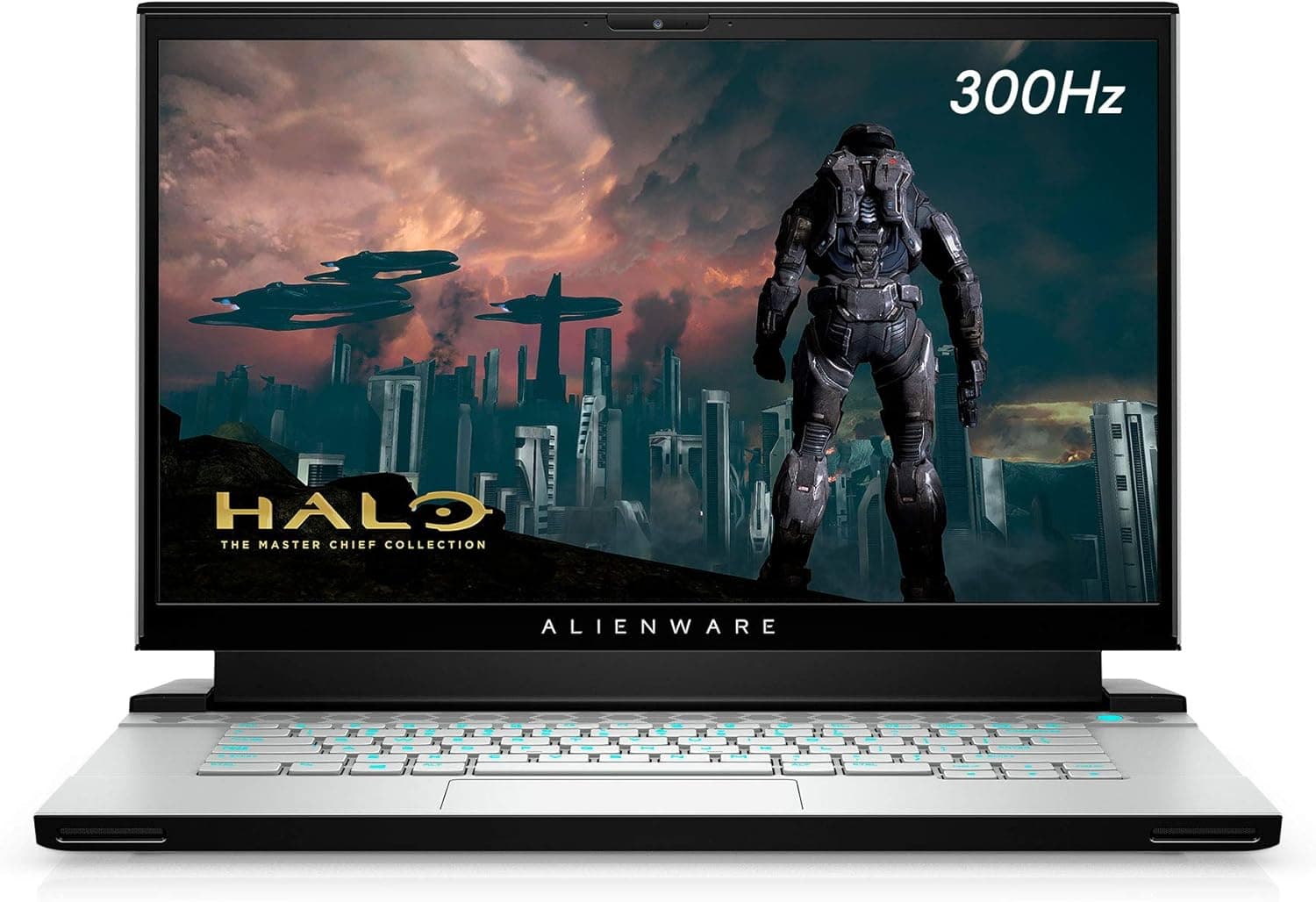
Alienware m15 R4 RTX 3070 ゲーミングノートパソコン フルHD (FHD) is a 15.6-inch gaming laptop released in 2021.
This article covers its specs, upgrade options, and the points that often trip up buyers.
Overview
The Alienware m15 R4 is a 15.6-inch gaming laptop from Dell's Alienware brand.
It uses an NVIDIA GeForce RTX 3070 (8GB GDDR6) and a 10th-gen Intel Core i7-10870H (8 cores, 16 threads, up to 5.0GHz).
The display is Full HD (1920x1080) with a 300Hz refresh rate.
In short, this is a machine for people who put smoothness ahead of resolution. It is not built to chase high-resolution visuals.
It fits competitive titles on a fast panel where quick motion matters.
Standard memory is 16GB DDR4-2933, and storage is a 1TB PCIe NVMe SSD. Wireless is Killer Wi-Fi 6 AX1650i (802.11ax) with Bluetooth 5.1, and there is also a wired LAN (RJ-45) port.
The chassis is Lunar Light (white) with rear illumination LEDs.
| Item | Detail |
|---|---|
| Display | 15.6-inch / 1920x1080 / 300Hz |
| CPU | Intel Core i7-10870H (8 cores / 16 threads) |
| GPU | NVIDIA GeForce RTX 3070 (8GB GDDR6) |
| Memory | 16GB DDR4-2933 (up to 32GB) |
| Storage | 1TB PCIe NVMe SSD (two M.2 2280 slots) |
| Weight | about 2.5kg |
| OS | Windows 10 Home |
All values in the table come from the specification data this site holds. Other configurations of the same model are in circulation, so check the spec section on the product page before buying.
Compatibility Guide
There is one USB 3.2 Gen1 Type-A port on each side.
The rear has a USB 3.2 Gen2 Type-C port (no Thunderbolt 3 support), HDMI 2.1 output, Mini DisplayPort 1.4, wired LAN (RJ-45), and a headset jack.
The lack of Thunderbolt is easy to overlook. External GPU enclosures and Thunderbolt docks will not work here.
Do not expect much from the USB-C port beyond data and basic video.
For external monitors, you can output through two paths: HDMI 2.1 and Mini DP.
If you want a larger screen or a dual-monitor desk, you may need a Mini DP adapter cable. Check the connector type before you buy.
Inside, there are two DDR4 SO-DIMM slots for up to 32GB. There are also two M.2 2280 PCIe NVMe slots that support RAID 0/1.
Note the memory standard: DDR5 SO-DIMMs will not work, so choose DDR4-2933 (SO-DIMM) compatible modules.
Opening the bottom cover requires special screws and some care. Opening it or upgrading parts may affect warranty terms, so confirm the warranty conditions before you start.
Product Info
The model was announced in January 2021 and went on sale in February 2021.Check the retailer's page for the latest price.
This configuration (RTX 3070, Core i7, 16GB, 1TB) sold for around ¥250,000 as a rough guide.
The price this site captured on Amazon.co.jp was ¥443,064 as of June 12, 2026.
That is well above the launch range, so it may reflect a third-party seller or a different configuration. Prices change often and this article is not updated, so check the product page for the latest figure.
Check the retailer's page for the latest user reviews. The rating looks strong, but the review count is modest.
New stock is limited, so most purchases now go through used or marketplace sellers.
Alienware's Cryo-Tech cooling is described as giving the CPU and GPU their own heat pipes and fans, aiming for stable behavior under load. This site has not measured temperatures or noise.
Recommended Users
First, this suits people who play competitive shooters and racing titles. The 300Hz panel helps keep fast motion smooth and makes enemy movement easier to track.
The RTX 3070 can handle higher resolutions, but this machine is best used at Full HD with its refresh rate exploited.
Second, it suits people who want one machine for gaming and creative work. The Core i7-10870H has 8 cores and 16 threads and can handle video editing and 3D work.
The panel is listed at 100% sRGB, so photo editing and design are possible too.
Third, it suits people who want to grow the machine over time. Two M.2 slots and two SO-DIMM slots let you upgrade as you go.
It is a poor fit if portability matters. It weighs about 2.5kg and its battery life is short.
Before You Buy
Price comes first. There is a gap between launch-era prices and the captured price.
Models of the same name differ by configuration, so check CPU, GPU, memory, and SSD before deciding.
Battery life is next. Under gaming use it lasts roughly 2 to 3 hours, so plan to use it near a power outlet.
The OS is listed as Windows 10 Home. Support status for Windows 10 may have changed, so check the product page and the official guidance on whether you can move to Windows 11.
If you buy used or from a marketplace seller, check battery wear, the keyboard, the exhaust vents, and whether an AC adapter is included. The adapter matters a lot for a gaming laptop.
Listing details on a product page can contain mistakes. Confirm the model using the photos and the title.
FAQ
Q. Can I upgrade the memory?
A. Yes. There are two DDR4 SO-DIMM slots, up to 32GB. DDR5 will not work.
Q. Can I add an SSD?
A. Yes. There are two M.2 2280 PCIe NVMe slots, and RAID 0/1 is supported.
Q. Does it support Thunderbolt?
A. No. The USB Type-C port does not support Thunderbolt 3.
Q. How many external monitors can I connect? A.
It has two outputs, HDMI 2.1 and Mini DisplayPort 1.4.
The number of screens and resolution depend on your monitors and cables, so check the product page.
Q. Is it worth buying now? A.
New stock is limited and prices fluctuate. If the price is high compared with launch, decide carefully.
Warranty and configuration checks come first.
Product Disclosure (Amazon)
- ASIN: B08XDX7CW8
- Note: This article covers a manufacturer-made product based on Amazon listing details.