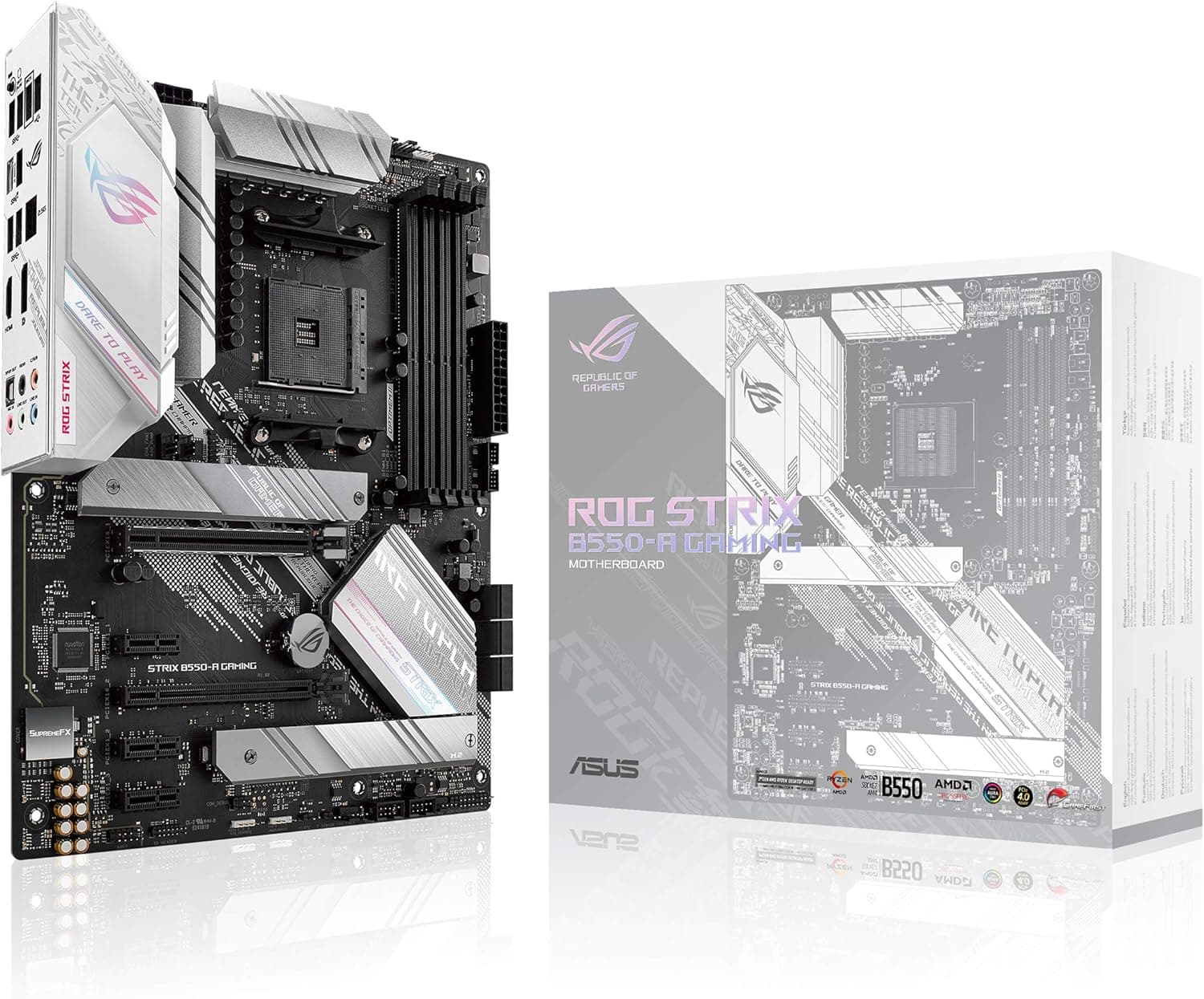
This article covers ASUS ROG Strix B550-A ゲーミング AMD AM4 Zen 3 Ryzen 5000 & 第3世代 Ryzen ATX ゲーミングマザーボード (PCIe 4.0.
Overview
The ASUS ROG Strix B550-A Gaming is a mid-high-end ATX motherboard that stands out with its clean white heatsinks and PCB. Built on the AMD B550 chipset and Socket AM4, it supports both Ryzen 5000 (Zen 3) and Ryzen 3000 series CPUs. It brings PCIe 4.0 to the mainstream: the primary x16 slot and the first M.2 slot run at PCIe 4.0 speeds, enabling faster graphics cards and NVMe SSDs. The 12+2 DrMOS VRM ensures stable power delivery even for 8-core or higher Ryzen CPUs, making it a solid foundation for a gaming or productivity build. Aesthetically, the white-on-white design is unique among B550 motherboards. It features addressable Gen 2 RGB headers and full Aura Sync compatibility, so you can coordinate lighting with other ASUS gear. Practical touches like BIOS Flashback allow you to update the firmware without a CPU or RAM installed—a real time-saver when upgrading to a newer Ryzen processor. On the audio front, the SupremeFX S1220A codec delivers high-fidelity sound, and the AI noise-canceling microphone technology helps keep voice chat crisp. For connectivity, there's a Realtek 2.5 Gigabit Ethernet port, HDMI 2.1 and DisplayPort 1.2 outputs, a USB 3.2 Gen 2 Type-C port, and dual M.2 slots with heatsinks.
Compatibility Guide
CPU Socket: AM4. This board works with Ryzen 5000 (Zen 3), Ryzen 4000G (Zen 2 APU), and Ryzen 3000 (Zen 2) series. Future AMD CPUs for AM4 are unlikely, but as of 2026, Ryzen 5000 remains a solid choice. Always check BIOS version for older chips. Memory: DDR4, up to 128 GB across four slots. Official support up to DDR4-4600+ (OC). The sweet spot with Ryzen 5000 is DDR4-3600 CL16 or CL18. ECC memory is not officially supported on consumer AM4. Form Factor: Standard ATX (305 x 244 mm). Fits most mid-tower and full-tower cases. Make sure your case has enough clearance around the rear I/O and the right-side cable management. Expansion Slots: One PCIe 4.0 x16 slot (CPU), one PCIe 3.0 x16 slot (chipset, x4 electrical), and two PCIe 3.0 x1 slots. Multi-GPU setups (SLI/CrossFire) are not supported, so plan for a single powerful graphics card. Storage: Two M.2 slots—first runs at PCIe 4.0 x4 (CPU), second at PCIe 3.0 x4 (chipset). Both have dedicated heatsinks. Additionally, four SATA 6 Gb/s ports are available. Power Connectors: 24-pin ATX, 8-pin EPS, and 4-pin EPS. For Ryzen 7 or Ryzen 9 CPUs, connect both EPS cables. Recommended PSU wattage: 650W or higher when pairing with a mid-range GPU (e.g., RTX 4070).
Product Info
The ASUS ROG Strix B550-A Gaming launched in mid-2020 and is still widely available at around ¥25,000–¥30,000 (as of August 2026). It comes with a 3-year warranty. Its market position is the “white PCIe 4.0 board that doesn’t break the bank” — offering the same core features as the B550-F Gaming but with a unique white aesthetic. It sits between entry-level B450 and high-end X570 boards, ideal for builders who want PCIe 4.0 without the extra cost of an X570 chipset.
Best Use Cases
White-Themed Gaming Build: If you're building a system with a white case, white GPU, and white cables, this motherboard is practically a must-have. Pair it with a Ryzen 5 5600X or Ryzen 7 5800X3D for a balanced gaming rig. The VRM can handle sustained loads, and the PCIe 4.0 x16 slot is ready for current-gen graphics cards. High-Speed Storage Power User: The CPU-linked PCIe 4.0 M.2 slot is perfect for a Samsung 990 Pro or WD Black SN850X. You'll get full Gen4 speeds for game loading and content creation workflows. The second M.2 slot (PCIe 3.0) is fine for bulk storage. * Cost-Conscious Upgrader: Want to move from an older Ryzen 3000 to Ryzen 5000? BIOS Flashback means you don't need an older CPU just to update the BIOS. This can save you from buying a cheap processor or paying a shop for the update. Who Should Skip This Board? Anyone who needs built-in Wi-Fi or Bluetooth. This board lacks an onboard wireless module. You’ll need to buy an M.2 Wi-Fi card (using the Key E slot) or a USB dongle. Also, if you plan to run two graphics cards, you’ll want an X570 board instead.
Things to Consider
No Onboard Wi-Fi: The most common complaint. If your desk is far from the router, factor in the cost and installation of a Wi-Fi card (~¥2,000–¥4,000). Single Full-Speed PCIe x16 Slot: Only the primary slot runs at PCIe 4.0 x16. The second x16 slot operates at PCIe 3.0 x4 via the chipset, making multi-GPU impractical. For a single RTX 4070 or RX 7800 XT, it's perfect. Chipset Fan Noise: The B550 chipset has a small fan that may become audible under heavy storage or USB traffic. In a well-ventilated case with low ambient noise, it's usually fine, but it's something to be aware of. Overkill for Budget CPUs: Pairing this board with a Ryzen 3 3100 or Ryzen 5 3600 is possible but wasteful. The extra VRM performance and PCIe 4.0 won't benefit those chips noticeably. A B4
Product Disclosure (Amazon)
- Manufacturer: ASUS
- Seller: ティーピーSHOP
- Fulfilled by: ティーピーSHOP
- ASIN: B08F9VP2RC
- Note: This article covers a manufacturer-made product based on Amazon listing details.